|
Wyatt Conner ME 305
|


|
|
Wyatt Conner ME 305
|
|
Timer.channel(channel, mode, ...) More...
Namespaces | |
| namespace | Lab_0x01 |
| : File enables a Nucleo to flash various signals on an LED. | |
Functions | |
| def | Conner_305_0x01.onButtonPressFCN (IRQ_src) |
| Determines when Nucleo Button has been pushed. More... | |
| def | Conner_305_0x01.update_STW (Current_Time) |
| Produces a sawtooth wave pattern. More... | |
| def | Conner_305_0x01.update_SQW (Current_Time) |
| Produces a square wave pattern. More... | |
| def | Conner_305_0x01.update_SIN (Current_Time) |
| Produces a Sin wave pattern. More... | |
Variables | |
| int | Conner_305_0x01.button = 0 |
| Button Variable is used to indicate wheter the button has been pressed or not. | |
| Conner_305_0x01.pinA5 = pyb.Pin (pyb.Pin.cpu.A5) | |
| pinA5 is a variable to define the pin being used for the LED. | |
| Conner_305_0x01.pinC13 = pyb.Pin (pyb.Pin.cpu.C13) | |
| pinC13 is a variable to define the pin being used for the button. | |
| Conner_305_0x01.tim2 = pyb.Timer(2, freq = 20000) | |
| tim2 is a variable that defines the timing in which the LED will operate on. | |
| Conner_305_0x01.t2ch1 = tim2.channel(1, pyb.Timer.PWM, pin=pinA5) | |
| t2ch1 is a variable that sends power input to our pinA5 to light up the LED | |
| Conner_305_0x01.ButtonInt | |
| ButtonInt is a variable that determines when the button has been pressed. More... | |
| int | Conner_305_0x01.state = 0 |
| State represents the numerical state the code is currently in. | |
| int | Conner_305_0x01.run = 0 |
| run determines keeps track of how many times the code has been ran. | |
| Conner_305_0x01.startTime = utime.ticks_ms() | |
| statTime determines the time the LED patterns begin. | |
| Conner_305_0x01.stopTime = utime.ticks_ms() | |
| stopTime determines the current time of the iteration. | |
| tuple | Conner_305_0x01.Current_Time = (utime.ticks_diff(stopTime, startTime)/1000) |
| Current_Time determines how much time has passed since the startTime. | |
Timer.channel(channel, mode, ...)
: File enables a Nucleo to flash various signals on an LED.
| def Conner_305_0x01.onButtonPressFCN | ( | IRQ_src | ) |
Determines when Nucleo Button has been pushed.
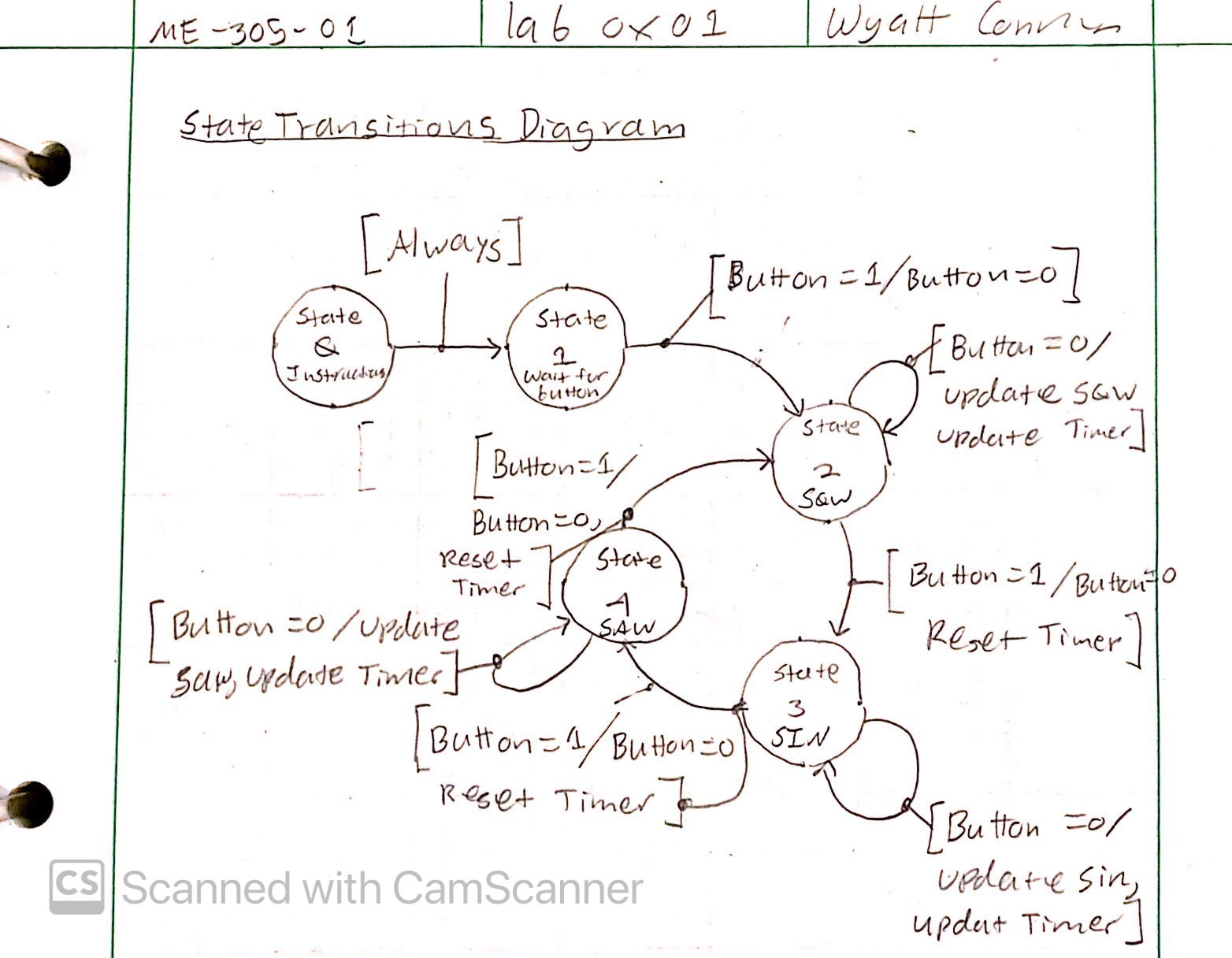
1.LED Flash Game This is a single file that is used to play a flash game, where pushing the button a nucleio will transition the different LED patterns. The patterns are as follows, sawtooth, square and sin wave.
This is our state transisiton diagram.
A video of the code running can be seen here:
| IRQ_src | This is an input variable retrieved from the nucleo that determines when the button is pressed. |
| def Conner_305_0x01.update_SIN | ( | Current_Time | ) |
Produces a Sin wave pattern.
The function produces a sin wave based upon the MCU remainder time so naturally the frequncy of the sin wave is one second. The sin wave has an amplitude of 0.5 and is offset by 0.5, so that no negative numbers are ouput.
| Current_Time | The current time of the MCU, or how long the code has been running. |
| def Conner_305_0x01.update_SQW | ( | Current_Time | ) |
Produces a square wave pattern.
The function creates a square wave pattern based upon the internal time of MCU. The output is 1 if time remainder is less than 0.5 and outputs 0 for greater than 0.5.
| Current_Time | The current time of the MCU, or how long the code has been running. |
| def Conner_305_0x01.update_STW | ( | Current_Time | ) |
Produces a sawtooth wave pattern.
The function creates a sawtooth wave pattern based upon the internal time of MCU, by outputing the time remainder divided by one.
| Current_Time | The current time of the MCU, or how long the code has been running. |
 1.9.2
1.9.2